
This post contains affiliate links, meaning that if you choose to click through and make a purchase, I will receive a small commission at no cost to you. I was also compensated to create this post, though all opinions are my own.
As many of you know, Pinterest is my number one social media source of both traffic and sales in my Shopify store. I talk about it in detail here. More than 50% of Pinterest users reside in households earning $50K or greater each year and 10% have a household income of above $125K. Plus, 93% of active pinners report using Pinterest to plan or make purchases. Pinterest attracts the ideal audiences for Shopify sellers.
Pinterest accounts for 93% of my social traffic and visitors from Pinterest stay on my page longer and are 3xs more likely to convert than other social sources. Remember that these numbers are based on a ZERO ad spend.
These are my personal results, but Tailwind also publishes the Typical Results of Tailwind Members every year, so you can see exactly what the average growth rate looks like for their members.
Pinterest Changes Affecting Shopify Sellers
Over the past few years, Pinterest has made several changes. I was a HUGE fan of Buyable Pins, which allowed Pinterest users to purchase your product directly from a pin without being redirected to your actual website. I loved this, but it was only offer to US based stores and it was quickly phased out. Then were were left with rich pins.
After Buyable Pins were phased out, I decided to sign up for Tailwind. Tailwind is a robust Pinterest scheduler unlike any other. The tool allows me to schedule product and blog pins from my Shopify store and develop a Pinterest schedule that amplifies my brand and encourages conversion.
My Pinterest strategy, which I outline in Pinterest for Shopify Ultimate Guide, involved spending 10-20 hours per month designing product and blog pins in Canva and then scheduling them in Tailwind. It became so time consuming that I actually hired a graphic design subscription to design the pins for me (Cost: $299/month). I was thrilled that my strategy was working and converting into sales, so I wasn’t concerned about the extra expense of the graphic design subscription.
Then, in May 2020, Pinterest launched an app that allows Shopify sellers to upload our product catalogs and turn them into shoppable pins. It is available in the US and Canada and has converted more sales in my Shopify store than the former Buyable Pins. Pinterest estimates that user engagement with shoppable Product Pins will increase by 44% year-over-year. This is great news for Shopify sellers.

What is Tailwind Create for Pinterest?
Over the years, Pinterest has been slow to roll out scalable ecommerce marketing solutions. Pinterest has mostly catered to bloggers and service based industries with copious amounts of blog content. Tailwind has followed Pinterest’s lead and hasn’t developed product upgrades or features that cater specifically to Shopify sellers. Until now!
I spoke with the Community Manager on Tailwind’s Marketing Team and she was excited to share that ecommerce specific tools will be rolled out shortly. I can’t wait to update you with more details. But, until then, I am thrilled to be on the beta testing team for Tailwind Create.
Tailwind Create is a game-changer for Shopify sellers who use Pinterest to drive sales. Pinterest is one of the main drivers of sales in my Shopify store and I use Tailwind to schedule all of my product pins. One of my favorite things about Tailwind is that I can schedule out a month’s worth of pins at one time. Tailwind will auto-publish my pins at the ideal time for my audience. With Tailwind Create, I can now create, schedule, publish, and analyze my pins all in one place!
I no longer spend several hours creating pins in Canva and I downgraded my graphic design subscription, saving me $150 immediately. I am LOVING Tailwind Create! All of the designs are optimized specifically for Pinterest and customized for my brand. Check out how I can take one product listing and generate hundreds of designs that I can customize. I choose a few of the best ones, make any edits I want, and schedule them. No design skills or Canva required!


Here’s What I Love Most About Tailwind Create
Tailwind took my product pinning to a new level, but Tailwind Create is the icing on the cake.
The biggest benefits to my brand are:
- Each design was created by Tailwind Create according to Pinterest’s creative best practices in mind.
- There are hundreds of variations that can be tweaked and edited in seconds.
- I am NOT a designer, but you’d never know it by looking at the product pins I create with Tailwind Create.
- My Pinterest workflow is even more streamlined now.
Start Creating and Pinning Today

Today is the perfect day to start pinning and driving more traffic to your Shopify store.
Step One: Create Your Pinterest Account
If you don’t already have a Pinterest account, create one now. It is important to optimize your account, your boards and pins so that they will be easily found in Pinterest search. If you need help with this, check out this service: Pinterest Account Creation and Optimization.
Step Two: Create Your Tailwind Account
Create your Tailwind account and select the plan that is best for you. Follow the steps to set up your account and link to your Shopify store. Tailwind will help your product pins get discovered by the right people.
Step Three: Start Using Tailwind Create
Look for the little paint brush on the left hand side. Set up your brand colors and logo and start creating product and blog pins! Once you select one or two of your favorites to test creative, schedule them and create some more for your next product or idea.
Step Four: Watch Your Analytics
How do you know which sales come from Pinterest? If you have Google analytics set up, you can check there. But, you can also check within the Analytics section of your Shopify dashboard.

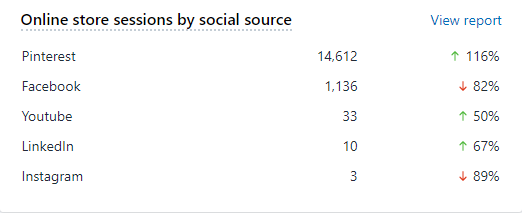
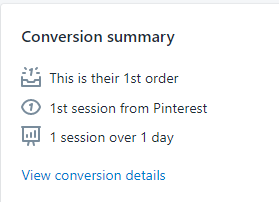
You can also see the conversion data for each order on the individual order page. If you sale came from Pinterest, it will look like this:
With all of the hype over Facebook ads, I feel strongly that a Pinterest/Tailwind combo is a much stronger ROI strategy for Shopify sellers.
If you have any questions about how to use Pinterest/Tailwind to make more Shopify sales, leave a comment below or join me in the All About Shopify Facebook Group.

Thanks Julie, this is a great post and very timely for me! I’m about to officially launch and the next thing on my agenda was to set up Shopify – and integrate it into my blog. I’m also concurrently working on the hot mess that is my Pinterest. I’m really looking forward to implementing your tips 🙂 x