

Increasing ecommerce website traffic is a primary focus for any business owner who sells online. Since launching my first ecommerce store in 2008, finding creative and effective ways to increase traffic is always high on my radar. Sponsored social media posts and Google ads are effective, when targeted correctly, but can become costly. Organic traffic, like the traffic resulting from blog posts, is the best kind because it is free. More importantly, blog posts can be crafted to be evergreen, meaning that they hang out on the web attracting customers forever. As a bonus, blog posts provide useful content for online store owners to post on social media, driving even more traffic.
PLEASE READ MY DISCLAIMER ABOUT AFFILIATE LINKS.
If you want to start a Shopify store, but have been putting it off, start here: Why You Should Start an Ecommerce Store Today.
When online store owners come to me looking to drive ecommerce website traffic, one of the first things I check is whether they have a blog and if it is updated regularly. If your ecommerce website doesn’t have a blog, you are missing out on free traffic to your store. A well-crafted blog designed to drive ecommerce website traffic is a bit different than other types of blogs. Blog posts have become a primary driver of website traffic to my store. Three of my top five landing pages over the past 12 days are blog posts, accounting for 54% of my online store’s total traffic. Two of the blog posts were published last year. Well crafted blog posts drive FREE organic ecommerce website traffic for years.

If you are ready to drive free traffic to your Shopify store with blogging, the Blogging for Shopify Bundle provides the exact, actionable steps you need for success.
Here are the important steps:
1. Strategize a Blog Topic
Unlike other types of blogs, an ecommerce website blog has a very specific purpose: to drive traffic (Buyers) to your online store. Think carefully about your typical customer and what they are Google searching. What makes them and their searches different?
One of my ecommerce websites is a golf cart parts and accessories store. When my customers email me questions about golf carts or specific products, I keep an ongoing list. I review the list monthly to learn if any topics keep coming up over and over. Those become the topics of my blogs.
For example, several times a month someone asks me the difference between one brand of golf cart and another. I put together this blog post based on that one question. It has been my experience that my golf cart audience responds well to “VS” blog posts. The posts that are structured “brand vs brand” or “type vs type” typically perform best with my audience and drive ecommerce website traffic most effectively. This one “VS” post drives between 4000 and 5000 hits each month.

Once you have decided on the perfect blog topic for your ecommerce store, decide on a blog post type. Varying your blog post types improves reader engagement. Here are some ideas for blog post types—> Create a Blogging Buzz: Top 10 Blog Post Types
HOT BONUS TIP: Set Google alerts for your target audience or niche so that you receive a steady stream of blog topic ideas in your email inbox each day.
2. Research Related Keywords
Why guess which keywords your audience is searching, when you can know for sure? Jot down a few keywords related to your topic and use a Keyword Finder to do some research. Mangools Keyword Finder is my favorite because they allow three free in-depth keyword searches per day. It is so useful to me that I quickly signed up for their Basic plan, which is only $12.42/month. The Basic plan allows for 100 keyword searches per day. They also include the SERP Watcher in some packages, which is an important resource for blog topic research. KWFinder is a great value and will help you take your ecommerce blogs to the next level.
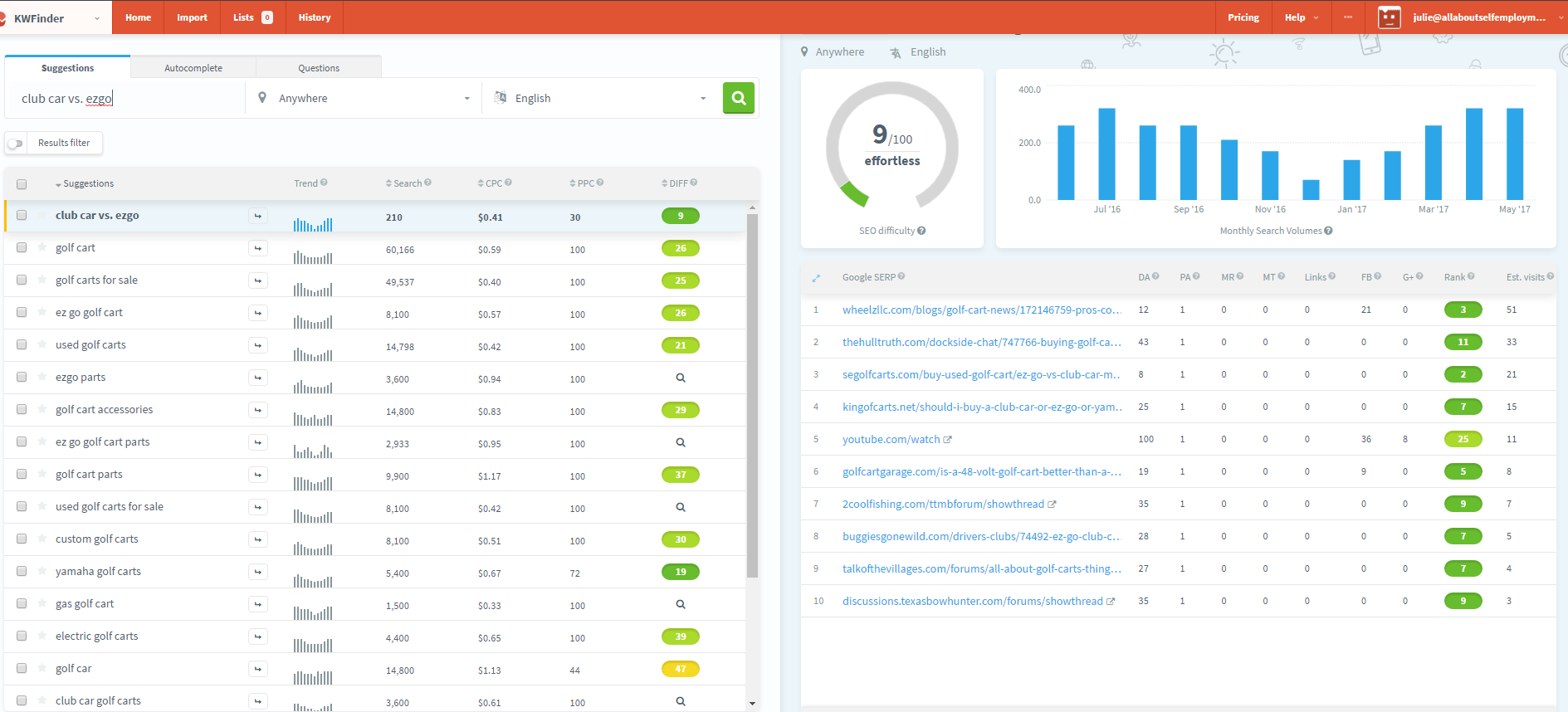
Here is a screenshot of my target keyword “Club Car vs. EZGO” in the KWFinder. Notice that I selected a keyword with low competition. I’m ranked 3rd in position and have the most visits each month than the competition. If you are struggling to get your ecommerce store ranked on the first page, keyword targeted blog posts can be your fastest path to the top.
Try it yourself right now.
3. Write Optimized Blog Posts
You may have heard of the Yoast plugin for WordPress. It is a powerful plugin that helps bloggers structure blog posts using the most effective structure. Shopify has a similar tool that it incredibly effective and well worth the $20/ month. Plug in SEO makes recommendations about structure, page titles, meta descriptions, and keywords for your blog AND your product descriptions. To check the SEO effectiveness of your ecommerce website, use Neil Patel’s free checker. It is surprisingly comprehensive for a free tool and even allows you to compare your website against your competitors. My golf cart parts store scored a B, so it looks like I still have work to do.

4. Create an Optimized Image
If you do not have a system in place to create blog images, check out Canva. It is free and simple to use. Select the Blog Post template and the size of your image will optimize. When you upload your image, be sure to include the Alt description and full length description. Include the keyword in the image description for a bit more SEO juice.
BONUS TIP: Optimized images are the perfect way to attract free traffic from Pinterest. Set up your Pinterest Business account, link your Shopify store correctly, optimize your images and pins and watch the traffic pour in.
Need help? Grab Pinterest for Shopify Ultimate Guide for the exact strategies I use to make thousands in sales with free Pinterest traffic.
5. Post Regularly
Since your website is an ecommerce site and not centered around your blog, it isn’t necessary to post every day. Focusing on effective, high quality blog posts is more important and posting once a month is enough to drive ecommerce website traffic. Aim for each blog post to have 800-2000 words for the most SEO impact.
Recommended Ecommerce Blogging Tools
The Blogging for Shopify Bundle– If you are ready to drive thousands of visitors to your online store and establish yourself as an industry expert, this ebook bundle is for you. Learn the exact steps that I use to create successful blog posts that attract buyers to my store by the thousands.
Shopify– Selecting an ecommerce platform with an architectural structure that supports driving ecommerce website traffic with blog posts is important. Not all ecommerce platform blogs are created equally. Shopify recommends blogging as an organic way to drive traffic and they make blogging easy and effective. With over 1 million active users who have sold over 34 billion dollars worth of product, it was easy for Shopify to earn my business. If you haven’t opened your online store yet, or if you are looking to switch platforms, sign up for Basic Shopify at only $29/month.
KWFinder– Mangools KWFinder has helped me to identify the keywords my customers are using that are low in competition. The keywords I have identified using KWFinder are the reason my website ranks higher than my competitors, even though my business is much smaller. Once you use the free keyword finder for a few days, you will quickly see the value in paying less than $13/month for this tool. After all, once your blogs begin to drive traffic to your ecommerce store, you won’t need to spend money on expensive ads anymore.
How to Increase Ecommerce Store Sales with Pinterest for Shopify (FREE Tutorial)– Is Pinterest part of your ecommerce marketing mix? If not, start today with this FREE step by step tutorial for setting up Pinterest for Shopify.
Plug in SEO- An add on to any Shopify store, Plug in SEO is a necessary tool if you are still struggling to understand SEO and want to be sure that not only your blog posts, but also your product listings, are optimized for search. After the free trial, the Shopify app is only $20/month. Find this in the Apps section of your Shopify store.
Neil Patel’s SEO Checker– A free resource, this tool provides a full report about your website and provides recommendations for SEO improvement. You can also enter in the websites of your competition and see how your ecommerce store stacks up.
Canva– If you are not a designer, this is the tool for you. Create professional blog post images quickly and easily with Canva. And, it is FREE.
The Short and Sweet
Driving ecommerce website traffic with blog posts attracts the perfect, converting audience without spending thousands on expensive ads. Regularly publishing blog articles allows you to brand your store as an industry authority within your niche and drive evergreen, organic traffic. If you need help coming up with blog topics or want a freelancer to write your blog posts, email me at Julie@allaboutselfemployment. I am always happy to help.

[…] not be convinced to try Pinterest. But, I like to keep the money I make and I am obsessed with driving organic traffic and low marketing […]
[…] out How to Drive Ecommerce Traffic with Blog Posts to increase organic traffic to your Shopify […]
Check out HiBREW Multiple Capsule Coffee Machine, Nespresso 19Bar 5 in 1 https://t.co/CNKTDhmvGB #eBay via @eBay